Pyproject Extension
Tombi provides enhanced features for Python projects through pyproject.toml, with special support for uv workspace and source metadata.
Experimentally, we provide additional features when editing pyproject.toml files.
These features are designed around the Python packaging ecosystem and currently understand uv-specific workspace conventions such as [tool.uv.workspace] and [tool.uv.sources].
Supported Features
Completion
The extension provides path-aware completion in places where pyproject.toml usually references local files or member projects.
[tool.uv.workspace]
members = ["packages/api"] # <- directory suggestions

[tool.uv.sources]
my-lib = { path = "packages/my-lib" } # <- file/directory suggestions

[project]
readme = "README.md" # <- file suggestions
license = { file = "LICENSE" } # <- file suggestions
license-files = ["licenses/*.txt"] # <- file suggestions

[build-system]
backend-path = ["backend"] # <- directory/file suggestions
Supported path completion targets include:
[tool.uv.workspace].members[tool.uv.workspace].exclude[tool.uv.sources].*.pathbuild-system.backend-pathproject.readmeproject.license.fileproject.license-files
Hover
For dependency entries, Tombi enriches hover content with package metadata.
[project]
dependencies = [
  "requests>=2.0", # <- package name and summary from PyPI
]

[tool.uv.sources]
my-lib = { workspace = true } # <- package name and description from the local member
Behavior:
- workspace and local path dependencies show metadata from the referenced member
pyproject.toml - registry dependencies can show package metadata fetched from PyPI
- in offline mode, remote PyPI lookups are skipped and only local workspace/path metadata is used
Go to Definition
For example, suppose you have a pyproject.toml like the one below:
Go to package definition from dependencies
[project]
name = "albatross"
version = "0.1.0"
requires-python = ">=3.12"
dependencies = ["bird-feeder", "tqdm>=4,<5"]

[tool.uv.sources]
bird-feeder = { workspace = true }
In this case, when your cursor is on workspace, executing "Go to Definition" will navigate you to the package definition managed by the workspace.
If you consistently want to navigate to the workspace manifest that defines the source, use "Go to Declaration".
Go to Declaration
[project]
name = "albatross"
version = "0.1.0"
dependencies = ["bird-feeder", "tqdm>=4,<5"]

[tool.uv.sources]
bird-feeder = { workspace = true }
In this case, when your cursor is on workspace, executing "Go to Declaration" will navigate you to the workspace definition in the workspace's pyproject.toml file.
Go to Declaration also works when the cursor is placed on the dependency string itself (for example "bird-feeder").
If the package comes from tool.uv.sources with workspace = true, the command jumps to the member entry in the workspace pyproject.toml, letting you inspect which pattern pulled the project into the workspace.
Code Actions
When editing member pyproject.toml files, additional refactor actions help you converge on workspace-managed dependencies.
Use Workspace Dependency
If the workspace already pins the dependency, select "Use Workspace Dependency" to strip the version requirement (and keep extras) so the member follows the workspace definition.
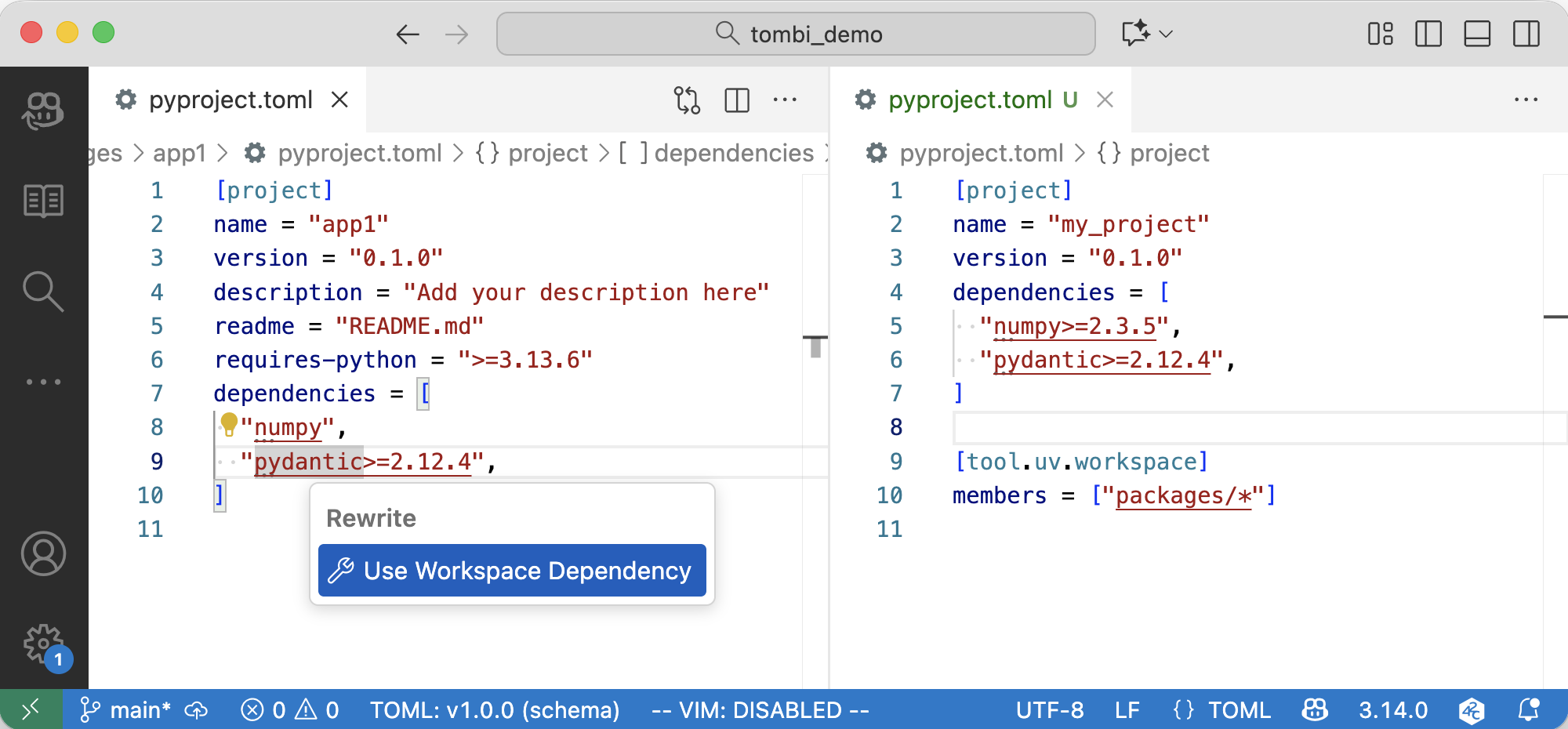
The action also works inside [project.optional-dependencies.*] groups.
Add to Workspace and Use Workspace Dependency
When the workspace has not registered the dependency yet, this action adds the current versioned requirement to the workspace's [project.dependencies] array and rewrites the member entry to use the shared dependency.
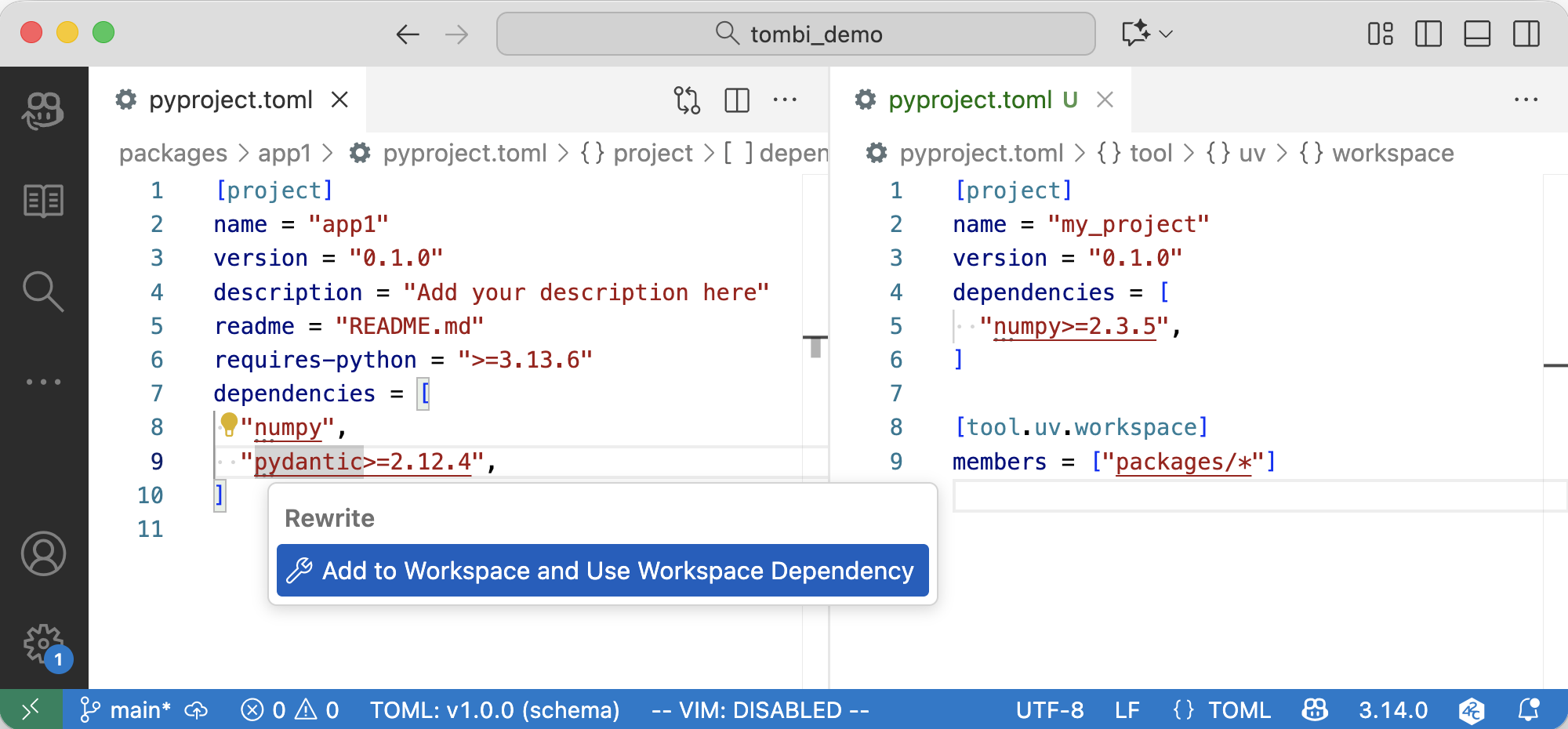
Document Links
The extension annotates key project metadata with document links so you can jump to the right file or website in one click:
- entries in
[tool.uv.workspace.members]and matches found via globs open the associated member project'spyproject.toml - sources declared under
[tool.uv.sources]withworkspace = trueexpose links to both the member manifest and the workspace root configuration - dependency arrays in
[project.dependencies],[project.optional-dependencies.*], and[dependency-groups.*]link to local workspace packages when available, or fall back to the package page on PyPI